

If you’ve ever made a call via Zoom, Teams, or a mobile app instead of a traditional desk handset, you’ve already used VoIP calling—whether you realized it or not. A VoIP phone looks and functions just like a regular phone, but instead of relying on a traditional landline, it routes calls over the internet.
This simple shift unlocks powerful features: virtual numbers, voicemail-to-email, video calls, call routing, CRM integrations, and the ability to answer business calls from anywhere. As more companies phase out outdated phone lines, VoIP phones have become the modern standard for business communication, offering clearer audio, lower costs, and unmatched flexibility for remote and hybrid teams.
In this guide, we’ll break down exactly what a VoIP phone is, how it works, and how to determine if it’s the right fit for your business.
What Is a VoIP Phone?
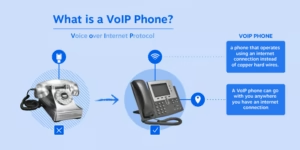
A VoIP phone (Voice over Internet Protocol phone) is any device that makes and receives calls using an internet connection rather than a copper phone line. Unlike traditional desk phones that connect to a PBX (Private Branch Exchange) or phone jack, VoIP phones connect to your network and route calls digitally. This includes dedicated VoIP desk phones, desktop softphone apps, mobile apps, and even browser-based calling tools.
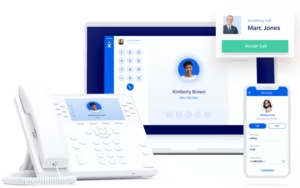
The key advantage of VoIP phones is their flexibility: your phone number isn’t tied to a single physical location. Calls can ring your desk phone, laptop, and smartphone simultaneously. Most VoIP phones also support advanced features like call forwarding, auto attendants, voicemail-to-email, video calling, and integrations with business tools such as CRM systems.
This flexibility is why VoIP phones have become essential for remote work, distributed teams, and businesses seeking modern communication tools free from the limitations of landlines.
VoIP vs. Traditional Phone Systems
The core difference between a VoIP phone and a traditional landline is the connection method: VoIP uses the internet, while landlines rely on copper wires installed by a local telephone provider. This difference translates to greater flexibility and efficiency for businesses using VoIP, as you can use your phone number from anywhere with an internet connection.
Here’s a quick overview of the key distinctions between VoIP and traditional PBX systems:
|
Feature
|
Traditional PBX (Landline)
|
VoIP Phone System
|
|---|---|---|
|
Connection
|
Landlines and extensions
|
Internet (no hardwired lines)
|
|
Upfront Investment
|
Large (on-site PBX hardware)
|
Minimal (only internet required)
|
|
Maintenance Costs
|
High (including staff)
|
Low (small monthly subscription)
|
|
Scalability
|
Requires new phone lines and physical equipment
|
Highly scalable (no physical upgrades needed)
|
|
Remote Access
|
Only via call forwarding
|
Use anywhere with internet
|
Beyond these basics, two key functional differences stand out:
-
Location flexibility: VoIP phones work anywhere with an internet connection—no need to be tied to a single office.
-
No physical phone required: You can make calls via apps on your computer or mobile device, eliminating the need for a dedicated handset.
Detailed Comparison: VoIP vs. Landline Phones
|
Functionality
|
VoIP Phones
|
Landline Phones
|
|---|---|---|
|
Phone calls (PSTN)
|
Yes
|
Yes
|
|
Nationwide long-distance
|
Included
|
Optional (extra cost)
|
|
User-to-user calls
|
Yes
|
Requires PBX
|
|
Caller ID
|
Yes
|
Yes
|
|
Call waiting
|
Yes
|
Yes
|
|
Ease of setup
|
★★★★★
|
★★★
|
|
Requires internet
|
Yes (100 Kbps per line)
|
No
|
|
Wireless support
|
Wi-Fi, DECT, and Bluetooth headsets
|
DECT and Bluetooth headsets
|
|
Reliability (internet/power outages)
|
Calls routed to another number/voicemail
|
Calls drop or go to voicemail
|
|
Technology
|
IP telephony (SIP, TLS, SRTP); HD audio
|
Analog voice signals
|
|
Call quality
|
★★★★★
|
★★★★
|
|
Setup cost
|
$0
|
$110 per jack
|
|
Monthly cost
|
$20–40
|
$50
|
|
Activation fee
|
$0
|
$50
|
|
Auto attendant
|
Included
|
Requires PBX
|
|
Phone number privacy
|
Included
|
Varies
|
|
Phone number changes
|
Included
|
$27
|
|
Hunt groups
|
Included
|
Requires PBX
|
|
Conferencing
|
Included
|
Three-Way Calling only
|
|
Call routing
|
Included
|
$9.95/mo
|
|
Call queuing
|
Add-on
|
Add-on
|
|
Remote work compatible
|
Yes (softphone apps)
|
Only via call forwarding
|
|
Call encryption
|
Yes (TLS & SRTP)
|
No
|
|
International dialing (per minute)
|
MX: $0.16; UK: $0.01; JP: $0.05
|
MX: $0.54; UK: $1.21; JP: $1.62
|
|
Business voicemail
|
Included
|
$13.95/mo
|
|
Integrations (CRM, text, surveys)
|
Yes
|
No
|
Sources: VoIP information based on Nextiva’s business phone plans. Analog information is based on business rates published in tariffs for Arizona.
How Does a VoIP Phone Work?
A VoIP phone places calls over the internet instead of copper phone lines. It connects to your network (via Ethernet, Wi-Fi, or an app) and links to your VoIP service provider, which handles call setup and routing. Here’s a step-by-step breakdown of what happens behind the scenes:
-
Registration: Your VoIP phone or app signs in to your provider using your account credentials. This tells the network where to deliver calls for your number.
-
Dialing: When you dial a number, the phone sends a digital request to the provider to start the call. If the other party uses VoIP, the call stays entirely online; if they use a landline or mobile network, the call routes through a VoIP-to-PSTN gateway to connect to the traditional phone network.
-
Voice to data conversion: As you speak, the phone converts your voice into compressed digital data packets using a codec (e.g., G.711 or Opus). These packets travel over the internet in real time.
-
Audio playback: On the receiving end, the packets are reassembled and converted back into sound, so the other person hears you instantly.
-
Feature management: Advanced features like caller ID, voicemail, call recording, and routing are managed digitally by the VoIP provider.
Because calls are transmitted online, you can receive them on your desk phone, laptop, or mobile app—all using the same business number. Despite the technical steps, the call feels just like a normal phone call with clear, real-time audio.
Want to learn more about the technology behind VoIP? Check out our beginner’s guide to SIP (Session Initiation Protocol).
Benefits of VoIP Phone Systems
VoIP systems eliminate the limitations of traditional phone lines and on-site PBX hardware by routing calls over the internet. This delivers greater flexibility, richer features, and simpler management—all without relying on physical phone wiring. Here are the top benefits:
Easy Setup & Integration
-
Simple installation with no complex wiring
-
Works over your existing internet connection
-
Seamlessly integrates with tools like Microsoft Teams and CRM platforms
Virtual & Linked Phone Numbers
-
Use virtual numbers for teams or multiple locations
-
Route and link multiple numbers to specific users or departments
-
Keep your existing business number when switching to VoIP
Mobility & Flexibility
-
Make and receive calls from desk phones, laptops, or mobile apps
-
Work from anywhere with an internet connection
-
Maintain the same caller identity across all devices
Advanced Calling Features
-
Visual voicemail and voicemail-to-email
-
Auto attendants and smart call routing
-
Bluetooth headset support and optional PoE (Power over Ethernet) for cleaner desk setups
Scalable & Cost-Efficient
-
Add lines and users without technician visits
-
No on-premise PBX hardware to maintain
-
Lower ongoing service and maintenance costs
Clear, Reliable Call Quality
-
High-definition audio for natural-sounding conversations
-
Consistent performance across supported devices
Businesses prefer VoIP because it’s easier to scale as teams grow and requires no technician visits for new lines—just an existing broadband connection and a VoIP provider. Note: Some businesses choose to retrofit their existing PBX to a cloud-based system using SIP trunking, which connects calls over IP networks. SIP is a common control protocol in VoIP, ensuring efficient call management and connectivity.
VoIP Phone Equipment
VoIP equipment falls into two main categories: desk (wired) phones and softphones. Most businesses use a combination of both, depending on their team’s work style and location.
Desk (Wired) VoIP Phones
Also called “hard phones,” these are physical handsets that sit on desks or in conference rooms. They connect to your network via Ethernet (or sometimes Wi-Fi) and often have programmable keys for speed dials, extensions, and call features.
Softphones
Software-based phones that run on computers, tablets, or mobile devices. With a headset or built-in microphone, users can make and receive calls from anywhere with an internet connection—using the same business number as their desk phone.
Many organizations mix these options: desk phones for in-office staff, softphones for remote or mobile teams, and dedicated conference phones for meeting rooms. This flexibility lets teams choose the setup that best fits their workflows while staying on one unified phone system.
By the way, if you choose Nextiva for your cloud phone system, you’ll get a softphone included in your package. Nextiva also offers a variety of certified VoIP phones and equipment guaranteed to meet your business needs.